How To Make Slideshow Wallpaper On Windows 10. Make your slideshow video with our customizable templates. Use windows 10 search function to change desktop background.
How To Create a Slideshow as Desktop Background (Windows from howtech.tv
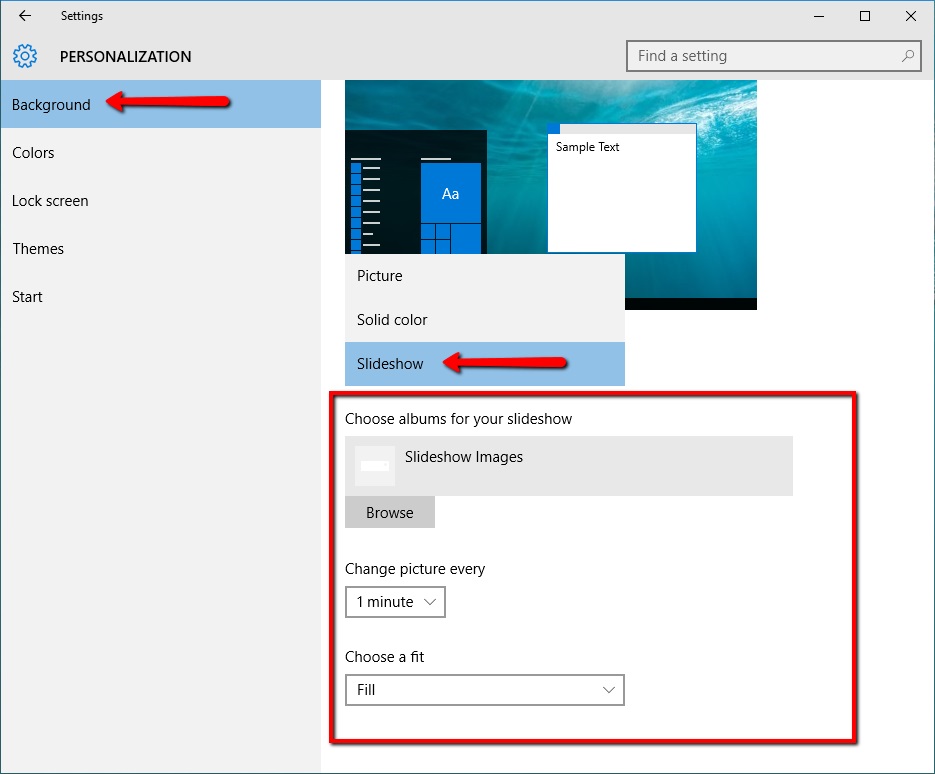
In actual fact the name of the new folder doesn’t really matter. Create a slideshow wallpaper in windows 10. With the background tab selected on the left, change the dropdown menu under background to slideshow.
To Do This On Creator's Update, Run Exactly:
If playback doesn't begin shortly, try. Head into the pictures folder within windows 10. Once created, simply copy and paste.
Microsoft Introduced Desktop Slideshow Feature With Windows 7 Os, And The Feature Is Present In The Latest Windows 10 As Well.as All Of You Know, Desktop Slideshow Feature Lets You Have A Slide Show Of Your Favorite Wallpapers.
The background section’s option lets you create a background from a picture, a color, or a slideshow. Back in the settings window, choose how often you want your desktop image to change. Choose “background” in the left panel of the “personalization” window.
In The Settings Panel, Open Personalization Settings.
On this menu, select personalization. Ad create a slideshow video in seconds! From a win+r (run) prompt.
Select Slideshow From The Background Dropdown Menu Under The Preview.
Fast & easy, get started today. I recommend created a slideshow folder under the pictures folder. The first step is to open the settings panel in windows 10, you can type settings in the start menu and press enter.
Get Started For Free Today.
In a win+r (run) prompt. Next, you will want to change the “background”. It’s also possible to use a onedrive folder if you already have images stored in a cloud account.